Improving the usability and information hierarchy of a complex A/B testing platform
As a lead UX researcher, I tackled the research challenges of this complex platform as a newbie to A/B testing, and led the testing sessions under 8 weeks with 7 non-technical users to identify the hidden friction and improve the design of an A/B testing platform.
MY ROLE
Lead Researcher
Project Manager
METHODOLOGY
Moderated Usability Testing
Think-Aloud
System Usability Score (SUS)
TEAM
Collaborated with:
2 Product Managers
4 UX Researchers
DURATION
Jan. – Mar. 2025
IMPACT
First-ever UX study that helped shape product roadmap
This was the first formal usability study on Optimizely's Feature Experimentation onboarding flow. The findings went directly to the team, informing the Q2–Q3 2025 product roadmap and future design decisions.
First
Usability study to surface onboarding experience pain points
14
We categorized 14 issues into 5 distinct usability friction themes based on severity
10,000+
Future experiments impacted by the recommended UI improvements
10+
Stakeholders at the final readout including PMs, designers, and engineers
"This is so insightful! I'm impressed by how your team navigated this in just a few weeks without an A/B testing background, the insights about the product are accurate and on-point."
——— OPTIMIZELY PRODUCT TEAM, POST PRESENTATION FEEDBACK
THE PROBLEM
A powerful and core product, yet confusing to use
Feature Experimentation is one of Optimizely's most used tools, but its confusing UI makes it hard for less technical users, like product managers, to launch A/B tests with confidence. Users have described it as confusing and unintuitive, breaking trust in a tool core to their workflow.
⭐️PROJECT GOAL⭐️
Improving FX adoption by identifying key paint points
Users were struggling with FX, driving up confusion and eroding confidence. Our goal was to pinpoint those pain points and turn them into design fixes that rebuilt trust.
CONTEXT
An A/B testing tool designed to make things easier for the non-technicals, but ended up confused users
Optimizely's Feature Experimentation platform gives product managers, marketers, and engineers the ability to run A/B tests and manage feature rollouts, without touching a single line of code.
However, we found that user struggled with the UI and felt they had to spend too much effort just to complete core actions.
No one had ever formally tested the onboarding experience from a usability perspective in Optimizely, and that gap became our entry point.
"Through the platform, users wouldn't need an engineer beside them just to run a test."
— OPTIMIZELY PRODUCT GOAL
Feature flag setup confusion
High cognitive load during onboarding
Unclear information hierarchy
What is Feature Experimentation?

STAKEHOLDER INVOLVEMENT
My role & who I worked with
This project was a collaboration between our UX research team and Optimizely's product team. I worked with my team to lead the study design, facilitated the pilot test, and moderated 4 out of 7 usability sessions. I led the data synthesis and collaborated with my team to present findings.
The Optimizely product team was our client. We discussed with 2 product managers to define the problems, product goals, outlined the critical user workflows, as well as narrowing down the target audience. The entire product team was present for the final presentation of this project.
Me
as a Lead UX Researcher
Study design, pilot test, moderated 4 sessions, data synthesis, deck creation, presented findings
4
Researchers worked with me
Collaborated with 4 researchers from define to testing and research
10+
Optimizely Product Team members
VP, PMs, researchers, designers, engineers who attended the final presentation readout
RESEARCH OBJECTIVE
Identify the exact friction points that cause non-technical users to fail or struggle when setting up an A/B test independently
How intuitive is the product?
Specifically around setting up and managing A/B tests end-to-end without prior training
Where do users break?
What challenges and frustrations emerge when navigating core features in a real-world workflow
Does terminology help or hurt?
How well do users understand the language of the interface while running experiments
RESEARCH PLAN
Planning with constraints
WEEKS 1–4
Study Planning + Recruitment
Product deep-dive, becoming the testers ourselves, interview protocol design, screener + recruitment
WEEKS 4–7
Facilitation + Data Collection
1 pilot test + 7 moderated sessions, think-aloud protocol, quantitative + qualitative data capture
WEEK 7–8
Synthesis + Readout
Affinity mapping, severity rating, recommendations, live presentation to 10+ stakeholders
METHODOLOGY
Why moderated usability testing?
Approach: Moderated Usability Testing
We conducted seven 60-minute remote sessions using a think-aloud protocol. Each participant completed six task-based scenarios in a hypothetical business context, followed by a post-test SUS questionnaire.
Sessions included a pre-test interview to calibrate experience level, six structured tasks, post-task probing questions, and a final SUS score.
WHY THIS METHOD
→
The product goal required non-technical independence. We needed to see exactly where and why they broke.
→
Think-aloud surfaces implicit confusion that survey data misses entirely
→
Moderated sessions let us probe in real time when something unexpected surfaced
OUR CONSTRAINTS
No A/B testing background
Recruitment
Complex technical product
8 week timeline
PROCESS
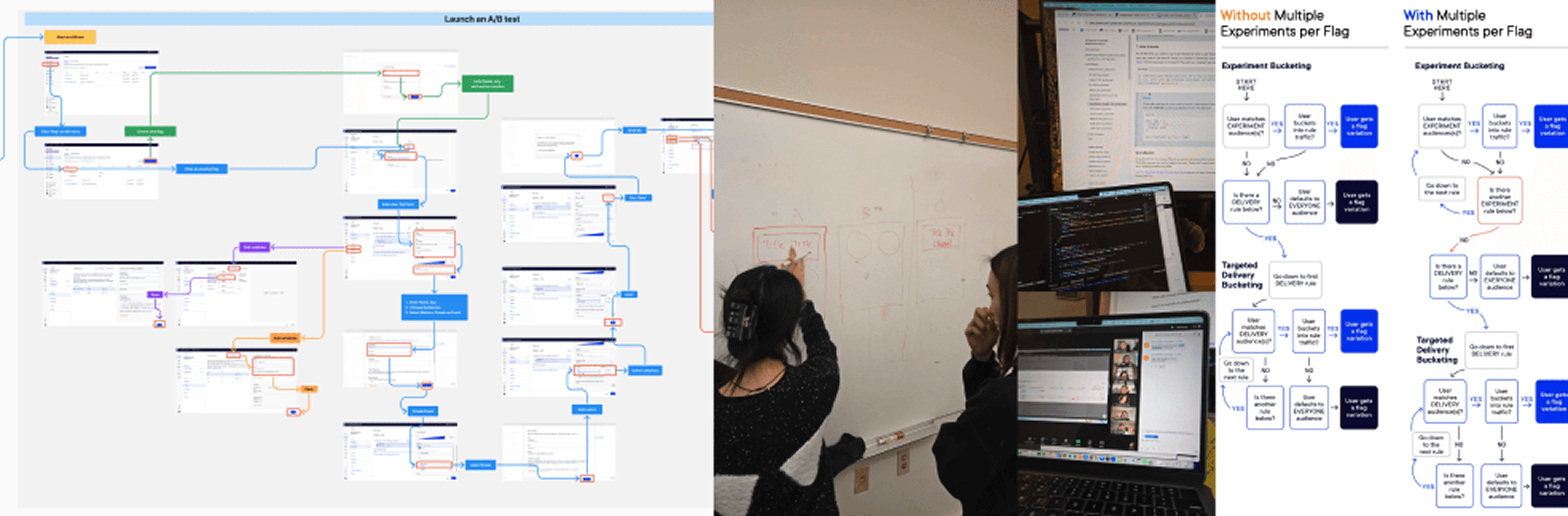
Onboarded as real users before testing to build product fluency and map the mental model
1
Product walkthrough & flow mapping
Mapped every interaction, feature, rule, and terminology in FigJam to understand the product's architecture
2
Became the users ourselves
Ran through every task scenario ourselves, surfacing confusion before participants ever saw the product, and see the product in their ways
3
Task design grounded in real workflow
7 tasks were designed to mirror how A/B testers actually work, so findings would reflect genuine user problems
RECRUITMENT
Testing the non-technicals
We recruited 7 participants representing Optimizely's target user: non-technical, with A/B testing experience but less than one year experience using Optimizely.
We wanted to mirror the realistic onboarding scenario: someone who understands experimentation conceptually but is new to this platform. Little-to-no programming experience was key, since the product's promise was non-technical independence.
Two participants (P4, P6) slightly deviated from the target profile. Their overlapping findings were included, unique outlier observations were logged as low-severity and noted separately.
Age range
20–40 years old
Technical background
Little to no programming experience (3 participants had SQL familiarity)
A/B testing experience
1 experienced · 5 limited · 1 none
Roles represented
Product managers, content specialists, business CEOs
FINDINGS
What we found
While participants appreciated the platform's customizability, five recurring themes of friction emerged. Two were high-severity, causing direct task failure. The SUS score of 58 confirmed usability was below acceptable thresholds.
58
6/7
4/7
5
HIGH SEVERITY
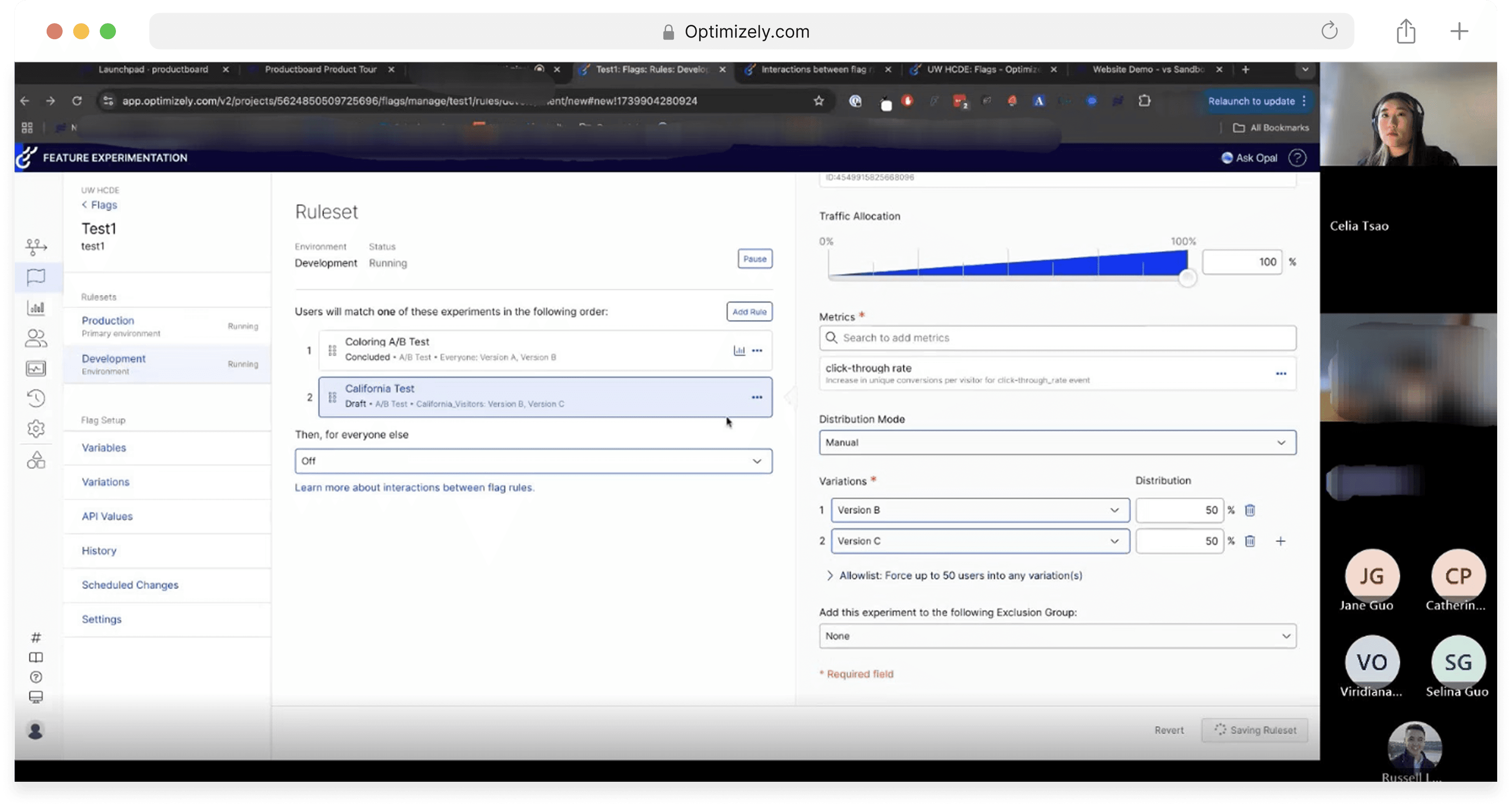
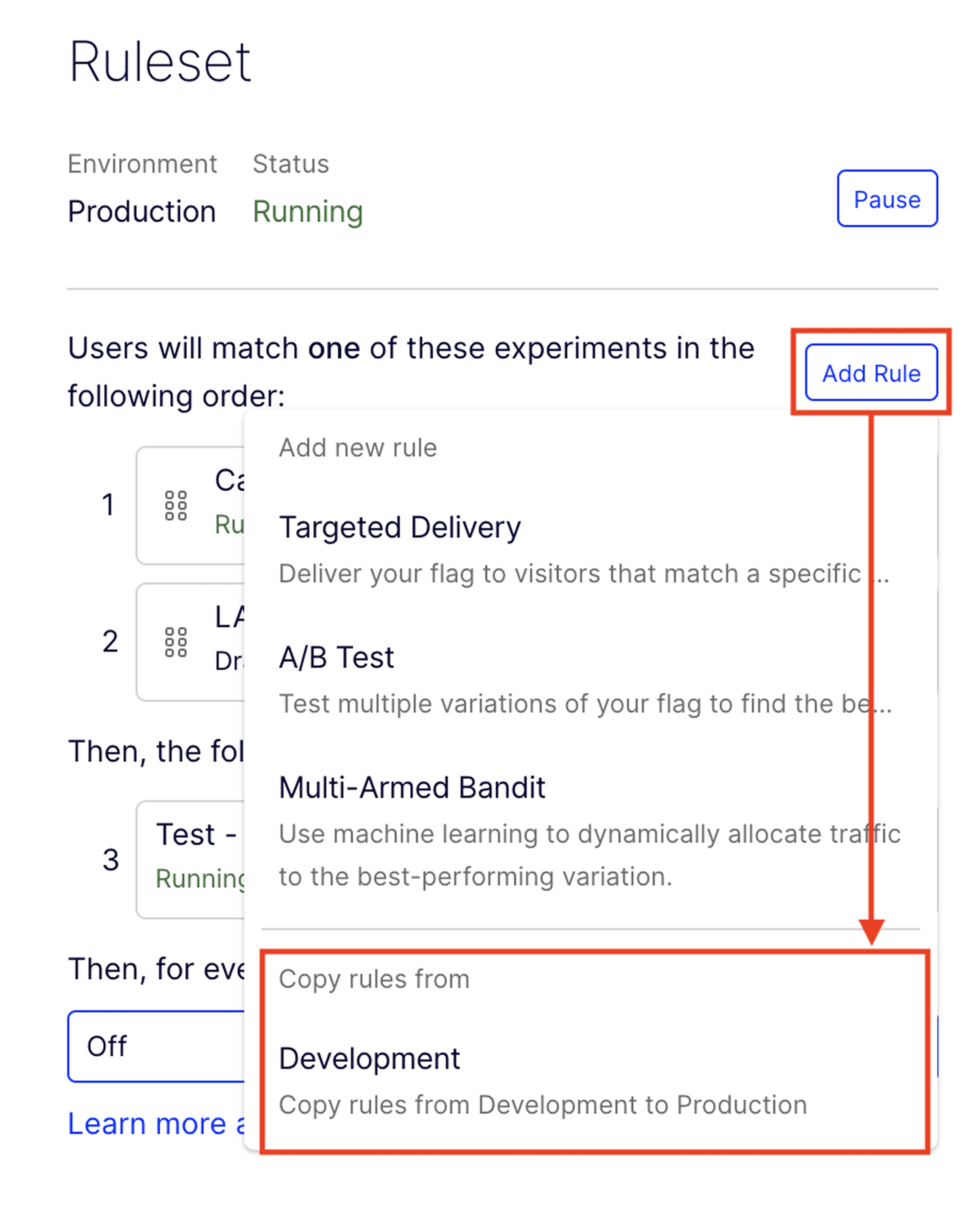
6/7 participants never noticed the "Copy Rule" option
WHAT WE FOUND
The "Copy Rule" feature, buried inside a dropdown under "Add Rule", was the intended path for transferring experiment setups from Development to Production. Almost no one found it without prompting. Users were also unsure what copying a rule would actually do, creating a second layer of uncertainty even after discovery.
DESIGN RECOMMENDATIONS
Separate "Copy Rule" as a standalone visible option rather than nesting it in a dropdown.
Add a visual indicator to "Add Rule". Consider a "Push to Production" feature that lets users deploy rules directly from development, eliminating the copy step entirely.
"Didn't notice the Copy Rule function until I was prompted." — P5
"Navigating from development to production was confusing. I would like to push the rule directly from development." — P2
HIGH SEVERITY
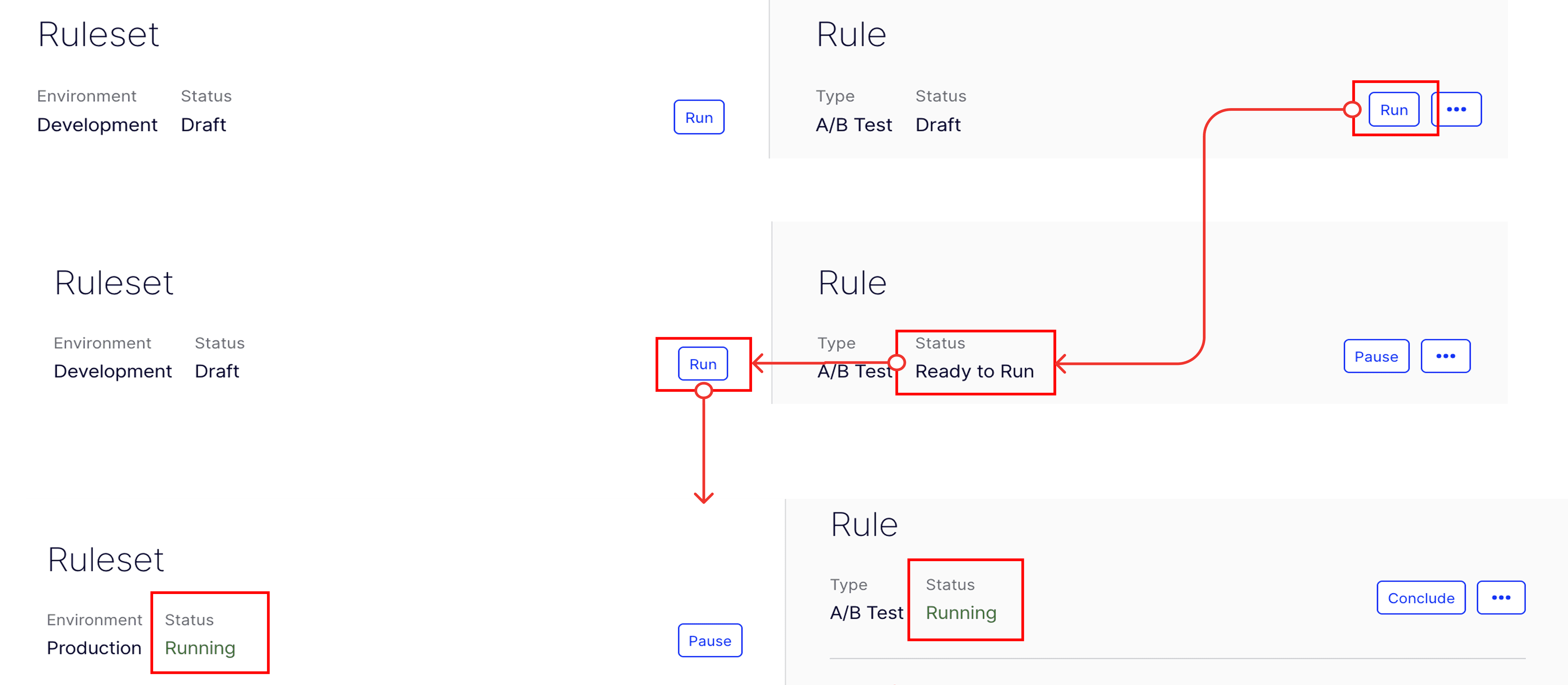
4/7 participants couldn't figure out how to run the test
WHAT WE FOUND
There are two distinct "Run" buttons: one at the Rule level, one at the Ruleset level. The sequence matters, but nothing in the UI communicates this hierarchy.
The status "Ready to Run" appeared after running the Rule, but participants interpreted it as confirmation the test was already running, not as a prompt to run the Ruleset next.
DESIGN RECOMMENDATIONS
Replace "Ready to Run" with action-oriented language: "Run Ruleset to Apply Changes", making the next step explicit.
Add step indicators (Step 1: Run Rule → Step 2: Run Ruleset) to create visible progression.
"I'm not sure how to run the test." — P2
MEDIUM SEVERITY / EXTRA TIME ON TASK
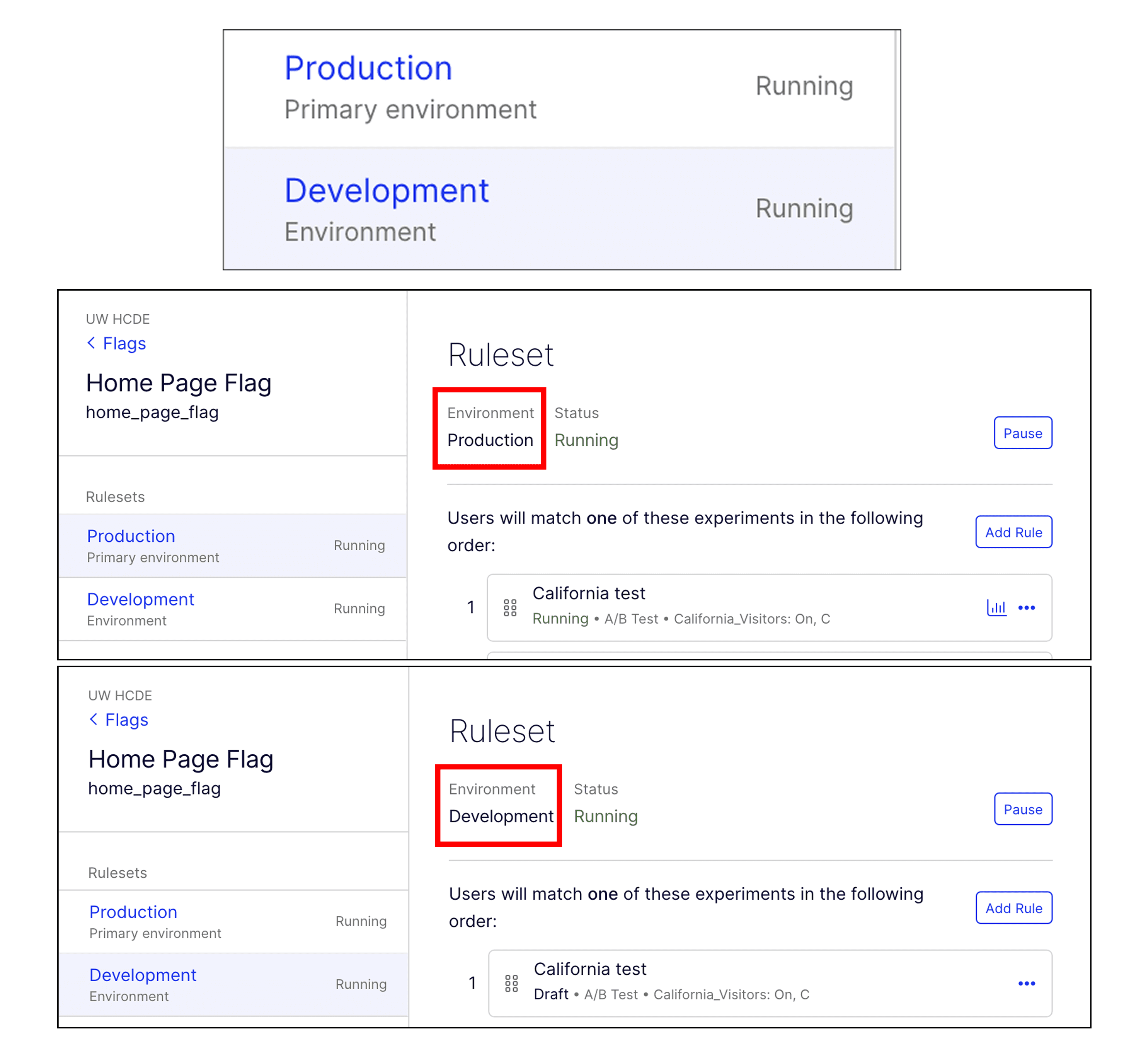
Development and Production environments were indistinguishable
WHAT WE FOUND
The two environments looked nearly identical. Several participants set up rules in the wrong environment and had to repeat steps, losing time and confidence.
DESIGN RECOMMENDATIONS
Add distinct visual differentiation between environments: color-coded headers, persistent environment badges, or a persistent banner that makes the current environment immediately obvious at all times.
"I'm unclear about whether the test should be in Development or Production." — P1
"Maybe just tell me the environment I'm in?" — P2
TAKEAWAYS
Become the user before designing: Remove everything I thought I know and rebuild, allowed me to frame and probe questions more aligned with how users see this product
Navigating a complex product with no A/B testing background and heavy jargons was challenging. Through collaborative problem-solving, asking questions, mapping workflows, and rebuilding my understanding step by step, I gradually built clarity and overcame the confusion.
In future studies, I'd like to handle outliers more intentionally: building the outlier decision on why they are included or excluded, into the planniing from the start rather than addressing it after data collection.